TunnelSats: Frequently Asked Questions
1. Overview & Value Proposition
Q.Why should I use this service?
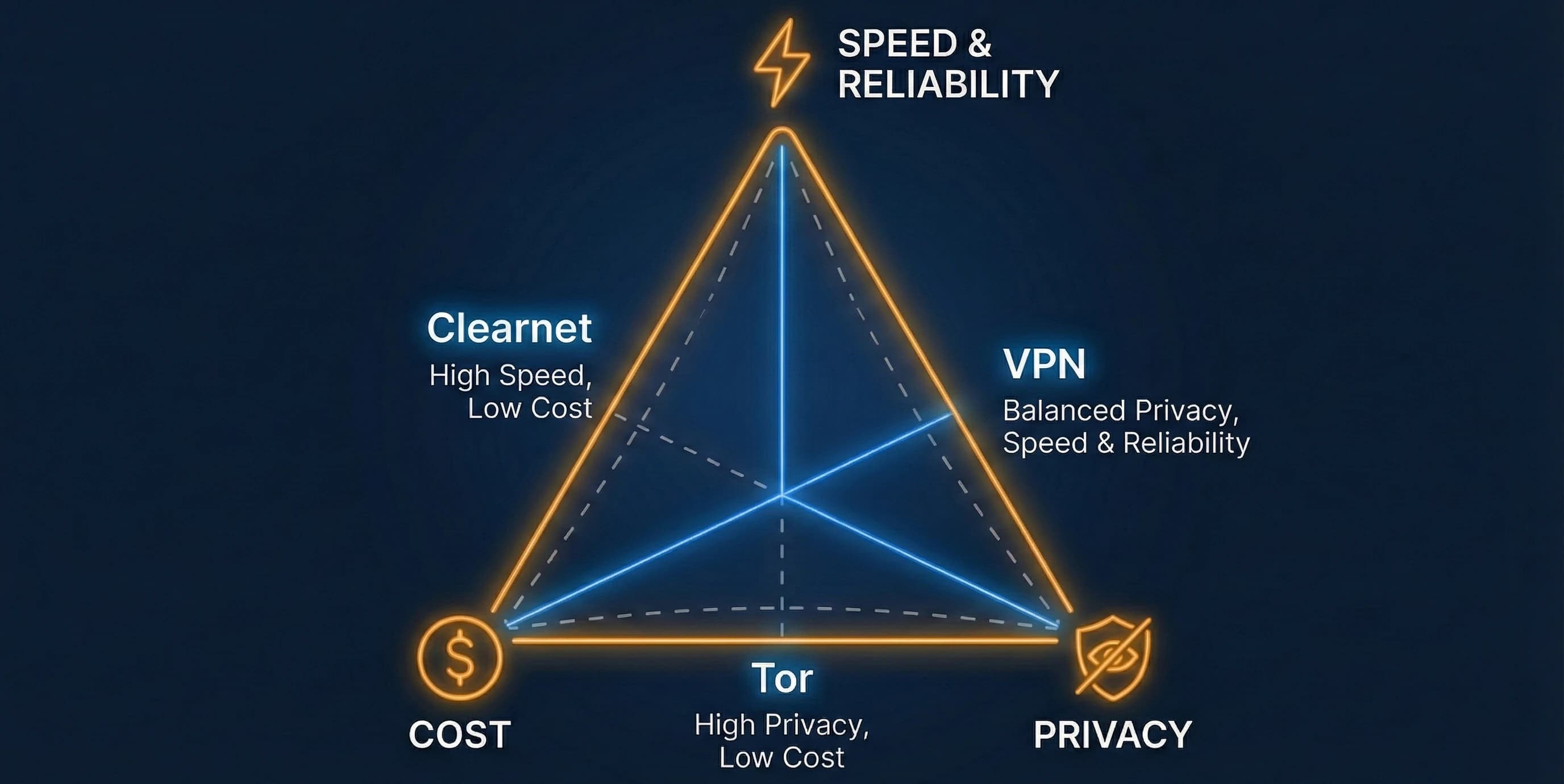
Providing Lightning ⚡ Services requires privacy, reliability, connectivity, speed, and liquidity. Relying on Tor alone for node connectivity poses risks to network stability, payment latency, and HTLC reliability.
With Hybrid1 connectivity, your payment and routing services are significantly faster and more reliable. However, exposing your residential clearnet IP reveals your physical location and opens your home network to potential DDoS or targeted attacks.
Tunnel⚡Sats offers the best of both worlds: your node and home IP remain hidden while our dedicated VPS public IP acts as your node's clearnet endpoint. This setup delivers higher reliability, improved uptime, fewer offline peers, and stronger routing performance.
Q.Why choose Tunnel⚡Sats over other VPN providers?
Running a Lightning node behind a VPN requires features that general consumer VPN providers do not offer. Tunnel⚡Sats is purpose-built for Lightning routing nodes:
- Anonymous Payment: Pay via Bitcoin Lightning (no KYC, no account name, and we do not know the sender).
- Static VPN IP: No disconnects due to rotating consumer VPN IPs and no Dynamic DNS setup.
- Dedicated Forwarded Port: Every subscription receives a dedicated TCP port mapped to your node (
9735). - Quantum-Safe Tunnels: WireGuard tunnels hardened with pre-shared keys (
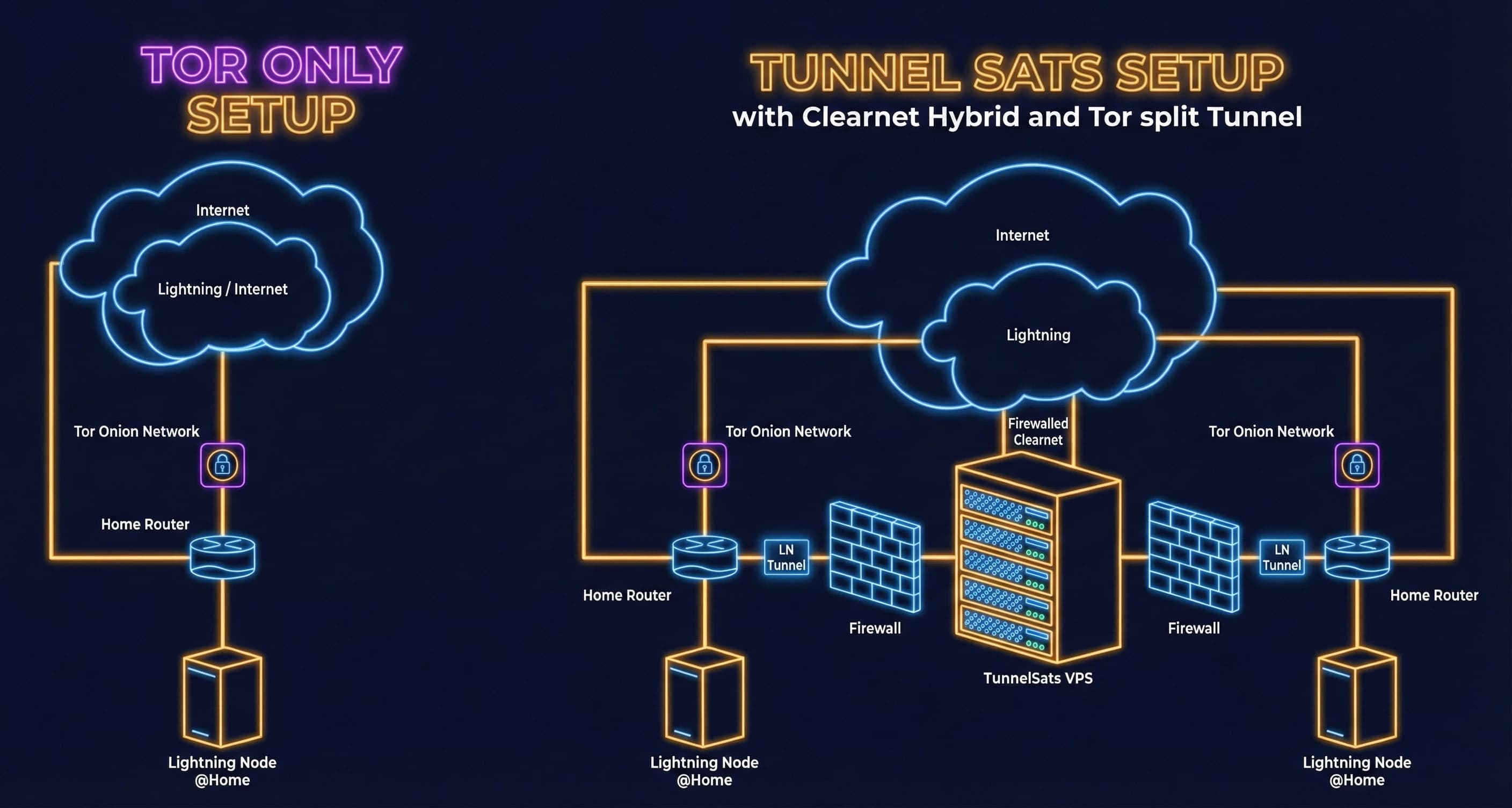
PresharedKey). - Split-Tunneling & Redundancy: Only Lightning P2P traffic routes through the VPN. Unlike "Tor over VPN," Tor and clearnet operate independently: if Tor degrades, your clearnet VPN stays up, and if the VPN drops, Tor remains active while the kill switch blocks clearnet IP leaks.
Q.How do I know what value I get from subscribing?
We recommend monitoring your peer latency, channel uptime, and routing volume week-over-week. Hybrid nodes typically observe faster peer handshakes, fewer offline peer flaps, and improved HTLC forwarding success compared to Tor-only nodes.
Q.What does the connection setup look like?
Below is an architectural comparison between a Tor-only node and the Tunnel⚡Sats hybrid setup:
Q.What can be found in the "My Dashboard" section?
After signing in with your Nostr browser extension (e.g., Alby, nos2x) or by signing a challenge message with your Lightning node (lncli signmessage / lightning-cli signmessage), My Dashboard provides:
- Subscription Details: Exact expiration timestamps, server endpoints, and real-time monthly bandwidth usage gauges.
- Streamlined Renewals & Bandwidth Resets: One-click Lightning renewals, non-custodial NWC auto-renewal configuration, and $1 monthly bandwidth counter resets.
- Referral Program: Your unique referral link to earn free bonus months for both you and your friends.
- API Key Management: Access to programmatic API keys and configuration details.
Q.Do you offer full-service VPNs too?
No. We specialize exclusively in Bitcoin Lightning node connectivity. For a general-purpose privacy VPN that accepts Lightning payments, check out LNVPN.net.
Q.Who built this?
From Node Runners for Node Runners 🧡
2. Privacy, Trust & Security
Q.What services are used?
- Payment Backend: LNbits for Lightning invoice generation and settlement.
- VPN Endpoints: Dedicated virtual servers across DigitalOcean (EU, Asia, NA), Hetzner (EU), and Vultr (LatAM).
- Management: WireGuard Manager and API for hardened peer provisioning.
- Monitoring: A dedicated instance of upptime paired with Globalping for worldwide latency telemetry.
Q.What about data storage and privacy?
Website & Tor Access:
- We use strictly essential session cookies for optional dashboard authentication only (zero third-party tracking or marketing cookies).
- Web server logs anonymize IP addresses by zeroing out the lower octets (for example,
1.12.123.234becomes1.12.0.0). - For maximum anonymity, you can browse and subscribe via our Tor Onion service: http://tunnelpasz3fpxhuw6obb5tpuqkxmcmvqh7asx5vkqfwe7ix74ry22ad.onion
Anonymity-First Login & Accounts:
- Accounts are keyed solely by your cryptographic public key (Nostr
npubvia NIP-07 extension or Lightning node pubkey vialncli signmessage/lightning-cli signmessage). - No email, password, or personal identity is required.
VPN Endpoints (Zero Packet Logs, RAM-Only Peer State):
- We store only your WireGuard public key, pre-shared key, assigned port, expiration timestamp, and aggregate monthly byte counter.
- We never inspect, capture, or log network packets from your node.
- While a WireGuard tunnel is actively shaking hands, the Linux kernel holds the peer endpoint IP in volatile memory (
RAM) to route return packets, and never writes it to disk.
Important: Save your
tunnelsats_<server>.conffile immediately upon download. Because we do not store your WireGuardPrivateKey, we cannot reconstruct your config file if lost.
Payments & Encrypted Notifications:
- Payments: We only record the Lightning payment hash for accounting; Lightning hides the payer's identity.
- Encrypted Notifications & NWC: Any email address or NWC (
nostr+walletconnect://) URI configured in the Notifications / Automation dashboard tab is salted and encrypted using your session key. We cannot read or recover these credentials without your active session, and you can toggle Disable Notifications at any time to purge them.
Q.Is your service reliable?
We deploy on tier-1 data center providers with 99.99% uptime SLAs, distribute servers across multiple independent providers and continents, and monitor every gateway 24/7 with automated alerting covered by three operations engineers. You can verify live health at any time on our Status Page and review our Warrant Canary.
3. Subscriptions, Pricing & Bandwidth
Q.Why are you charging fees?
We incur continuous infrastructure costs for high-bandwidth, low-latency VPS gateways (even idle Lightning nodes exchange continuous gossip traffic) as well as engineering hours for security patching, OS package maintenance, and 24/7 monitoring.
Multi-month subscriptions receive automatic discounts on both the website and Public API:
| Duration | Discount | Total Price (USD Equivalent) |
|---|---|---|
| 1 month | 0% | $3.00 |
| 3 months | 5% off | $8.55 |
| 6 months | 10% off | $16.20 |
| 12 months | 20% off | $28.80 |
Can I build my own VPS tunnel instead? Yes - we encourage learning! However, Tunnel⚡Sats provides a hardened, zero-maintenance service with multi-region servers, automated NWC renewals, native Umbrel/StartOS packages, and strict split-tunnel kill switches without the burden of managing your own cloud VPS and firewall rules.
Q.Is there a data transfer limit?
Yes, each subscription includes 100GB per month, which is more than sufficient for the vast majority of routing nodes.
If you reach the 100GB monthly allowance, your VPN tunnel will be rate-limited/restricted until the next monthly cycle or until you perform a Bandwidth Reset:
- Open My Dashboard on tunnelsats.com (or use the Reset Bandwidth action in the StartOS 0.4 package).
- Click Reset bandwidth ($1) on your subscription (available at any usage level; a "Running low on bandwidth" warning appears starting at 70%).
- Paying the $1 invoice resets your current month's usage counter back to
0immediately so your full 100GB allowance is available again (resets do not stack on top of remaining allowance, and are capped at 2 resets per calendar month).
Note: LND versions older than
v0.18.4had a known gossip bug causing excessive bandwidth consumption. Always keep your Lightning implementation updated.
Q.How can I extend my subscription?
You can renew manually or automatically without replacing your .conf file or restarting your node:
- Manual Web Renewal: Open the Renew tab on tunnelsats.com (or sign in to My Dashboard), enter your WireGuard public key (
# myPubKeyin your.confor fromsudo wg show), select an extension term (1,3,6, or12months), and pay the invoice. - Automatic NWC Renewals (Web Dashboard): Connect a Nostr Wallet Connect (NWC) URI in your Dashboard:
- Duration & Discount Preservation: Auto-renewal renews for the same duration as your previous purchase (for example, a 12-month plan renews for another 12 months with the 20% discount).
- Timing & Budget: Triggered 1-3 days before expiry. Set your wallet budget slightly above the expected sats amount (roughly
1.2x) to account for BTC/USD exchange rate fluctuations.
- StartOS 0.4 In-App Renewal: Run Renew Subscription in the StartOS TunnelSats package to pay via a node Pay Invoice task, or configure Connect Wallet inside the StartOS package so NWC auto-renewal runs directly on your own server (triggering 7 days before expiry with automatic fallback to a node Pay Invoice task).
- Nostr Bot Expiry Reminders: Link your WireGuard public key via encrypted DM to the TunnelSats Bot (
/link <wgPublicKey>) on Armada to receive proactive DM alerts at 7, 3, and 1 days before expiry.
Q.How do I switch from phased-out servers (e.g. de1 / de3 to de2)?
We have consolidated our German VPN fleet onto our primary high-capacity de2.tunnelsats.com (Nuremberg) gateway and retired de1.tunnelsats.com and de3.tunnelsats.com (us1.tunnelsats.com was seamlessly merged into us3.tunnelsats.com at the DNS and peer layer).
If your node is on de1.tunnelsats.com or de3.tunnelsats.com, claim your replacement configuration directly from the TunnelSats Web UI:
- Open the Renew tab on tunnelsats.com, enter your current WireGuard Public Key, and click Check Status.
- Click Review Consolidation Offer to carry over 100% of your remaining subscription time plus +30 bonus days.
- Enter the PrivateKey from the
[Interface]section of your existingtunnelsats.conf(orwg0.conf) to cryptographically prove ownership, then click Accept Offer & Get New Config. - Download your new
de2.tunnelsats.comconfiguration file and note your new forwarding port. - Install the new configuration and update your Lightning external address (
externalhosts=de2.tunnelsats.com:<newPort>for LND, orannounce-addr=de2.tunnelsats.com:<newPort>for Core Lightning).
7-Day Zero-Downtime Grace Window: Accepting the consolidation offer does not immediately disable your legacy
de1orde3tunnel. Your existing connection stays active for 7 days so you can switch configurations at your convenience without downtime.
4. Platform & Setup Questions
Q.Which setups are supported?
We support and test the following platforms (see the full Setup Guide for step-by-step instructions):
- Umbrel (
umbrelOS 1.0 - 1.5+) - via the dedicated TunnelSats Umbrel App (Guide: Option A) - StartOS (
v0.4.0+) - for LND, Core Lightning, and Eclair via the native TunnelSats StartOS package (Guide: Option B) - RaspiBlitz (
v1.8.0+) - for LND and CLN viatunnelsats.sh(Guide: Option C) - myNode (
v0.3+/ Debian 12) - tested & supported for LND viatunnelsats.sh --managed mynode --impl lnd(--impl lndselectslnd.servicewhenlit.serviceis also active on myNode; Core Lightning / CLN is N/A on myNode) - RaspiBolt / MiniBolt / Bare Metal Linux (Debian/Ubuntu, kernel
5.10.102+,nftables 0.9.6+) - for LND and CLN viatunnelsats.sh
For any other setup, reach out to our team on the Support Page.
Q.Where do I find my lightning configuration file?
Configuration file paths depend on your node platform:
LND (lnd.conf / lnd_extra_config.conf):
iniRaspiBlitz:  /mnt/hdd/lnd/lnd.conf
RaspiBolt:   /data/lnd/lnd.conf
Umbrel:      /home/umbrel/umbrel/lnd/lnd.conf
Umbrel 0.5+: /home/umbrel/umbrel/app-data/lightning/data/lnd/lnd.conf
myNode:      /mnt/hdd/mynode/settings/lnd_extra_config.conf
myNode Config Note: On myNode,
lnd.serviceregenerates/mnt/hdd/mynode/lnd/lnd.confon every restart viamynode_gen_lnd_config.sh. Add your hybrid settings to/mnt/hdd/mynode/settings/lnd_extra_config.confover SSH or in the myNode Web GUI under LND -> Config -> Additional LND Config.
Core Lightning (config):
iniRaspiBlitz:  /mnt/hdd/app-data/.lightning/config
RaspiBolt:   /data/cln/config
Umbrel 0.5+: /home/umbrel/umbrel/app-data/core-lightning/data/lightningd/bitcoin/config
Locating Configs & Transferring
tunnelsats_<server>.conf:
- Umbrel & StartOS 0.4: No
scpfile transfer is needed! Paste your.confdirectly into the Subscribe / Import screen in the Umbrel App or the Import Subscription action in StartOS.- Terminal Nodes (
scp): Runscp tunnelsats_<server>.conf [email protected]:/home/admin/from your computer, or create the file on your node withnano.- Find Commands: If you cannot locate a config file on your node, run:
- TunnelSats config:
sudo find / -maxdepth 5 -type d \( -path /etc/wireguard -o -path /sd-root \) -prune -o -type f -name "tunnelsats*.conf" -print- LND config:
sudo find / -name "lnd.conf"- CLN config:
sudo find / -name "conf"
Q.How to install and migrate to the Umbrel App?
The dedicated TunnelSats App for Umbrel replaces the legacy manual bash script and is available in the Umbrel Community App Store (https://github.com/Tunnelsats/ts-umbrel-app) and under review for the Official Umbrel App Store (PR #4919). See Option A in the Setup Guide for the full walkthrough.
- New Users: Add
https://github.com/Tunnelsats/ts-umbrel-appunder App Store -> More (...) -> Community App Stores, install TunnelSats, purchase or import your.confunder Subscribe / Import, and connect LND or CLN in the Installation tab. - Migrating from
tunnelsats.sh:- Recover your active config if needed:
sudo awk '1;/PersistentKeepalive/{exit}' /etc/wireguard/tunnelsatsv2.conf - Remove the legacy host-level script setup (on
umbrelOS 1.6+, a simple reboot already clears legacy host-level services; onumbrelOS 1.0 - 1.5, run the SHA-256-verified legacy uninstaller pinned at commite281584, the final revision containing the ownership-scoped Umbrel host uninstaller):bashcurl -fsSL https://raw.githubusercontent.com/Tunnelsats/tunnelsats/e2815848bc11932daff0479af59f21e53503b95b/scripts/tunnelsats.sh -o /tmp/tunnelsats-legacy.sh echo "6ebcd135ab9b5c8da5374211a7d2dd8129536a1deaa5b04b83b22be0cb7fe2a5 /tmp/tunnelsats-legacy.sh" | sha256sum -c - sudo bash /tmp/tunnelsats-legacy.sh uninstall --keep-config rm -f /tmp/tunnelsats-legacy.sh - Install the Umbrel App, paste your config into Subscribe / Import, and click Connect.
- Recover your active config if needed:
- How Umbrel Secure Mode Works: The official Umbrel App Store version runs in Secure Mode (without root Docker socket access). In Secure Mode, the app displays the exact target path (e.g.,
/home/umbrel/umbrel/app-data/lightning/data/lnd/lnd.conf) and configuration lines with Copy-to-Clipboard buttons so you can paste them via the Umbrel Files app or SSH and restart your Lightning app. Installing from the Community App Store allowsSECURE_MODE=falsefor automated configuration and restarts.
Q.How do I configure TunnelSats on StartOS 0.4?
The native TunnelSats package for StartOS 0.4 (LND, Core Lightning, and Eclair) is available in the Start9 Community Registry (latest release, source: Start9-Community/tunnelsats-startos). It requires LND 0.21.3-beta:10, Core Lightning 26.6.8:3, or Eclair 0.14.3:3 (or newer). See Option B in the Setup Guide for complete step-by-step instructions.
- How It Works: You buy or import your subscription in Services -> TunnelSats -> Actions (Buy Subscription generates your WireGuard keypair locally on your server and raises a Pay Invoice task on your node; Import Subscription imports an existing
.conf). You then accept a 1-click clearnet-vpn task on your Lightning node, which brings upwg0inside the node's own container with zero StartOS system gateway changes and zero port9735conflicts. - Kill Switch & Lifecycle: Supported node packages enforce IPv4 and IPv6
blackholedefault routes in routing table51820inside the Lightning container so clearnet traffic is dropped ifwg0goes down while Tor peers stay connected. Before uninstalling TunnelSats on StartOS, always run Export WireGuard Configuration (and disable TunnelSats under Configure if you want the node to stop running its tunnel).
5. Advanced Networking (Tailscale, Mullvad, Tor)
Q.Am I still able to connect to gRPC or Rest via Tailscale/Zerotier?
Yes. As of commit 24f0f3c, ports 10009 (gRPC) and 8080 (REST) are excluded from the TunnelSats split tunnel so you can connect to your node remotely via Tailscale or ZeroTier without interference.
Q.Running TunnelSats v2 and Mullvad in parallel?
Yes, with an nftables exclusion table so Mullvad does not hijack TunnelSats packets:
- Ensure Mullvad starts before TunnelSats.
- Create
exclude.rulesto mark and bypass Mullvad firewall rules:shtable inet excludeTraffic { chain allowIncoming { type filter hook input priority -100; policy accept; ip saddr <IP_OF_TUNNELSATS_VPN> ct mark set 0x00000f41 meta mark set 0x6d6f6c65 iifname tunnelsatsv2 ct mark set 0x00000f41; } chain allowOutgoing { type route hook output priority -100; policy accept; ip daddr <IP_OF_TUNNELSATS_VPN> ct mark set 0x00000f41 meta mark set 0x6d6f6c65 oifname tunnelsatsv2 ct mark set 0x00000f41; } } - Replace
<IP_OF_TUNNELSATS_VPN>with your assigned TunnelSats server IPv4 address. - Apply the rules:
sudo nft -f exclude.rules.
Q.Is it possible to run another WireGuard Tunnel besides TunnelSats?
Yes. Create a separate WireGuard configuration file (e.g., myvpn.conf) using a different subnet (do not use 10.9.0.0/24) and set Table = off:
ini[Interface]
PrivateKey = <YOUR_PRIVATE_KEY>
Address = <YOUR_IP>
Table = off

[Peer]
PublicKey = <PEER_PUBLIC_KEY>
Endpoint = <PEER_ENDPOINT>
AllowedIPs = 0.0.0.0/0
Start it with wg-quick up myvpn.conf.
Q.Tuning Tor
To improve Tor circuit stability alongside your clearnet VPN tunnel, you can append these settings to your torrc file:
iniLongLivedPorts 21,22,706,1863,5050,5190,5222,5223,6523,6667,6697,8300,9735,9736,9911
UseEntryGuards 1
NumEntryGuards 8
6. Verification & Troubleshooting
Q.How do I verify the tunnel and my connection are working correctly?
-
Verify Outbound Traffic (The public "face" of your node):
- Umbrel App (
umbrelOS 1.0+): Check the status badge and Health Check tab in the TunnelSats App Dashboard, or verify over SSH:
This makes an outbound request through the tunnel interface inside thesh# Community App Store installs (bundled host verifier): sudo ~/umbrel/app-data/tunnelsats/scripts/verify.sh # Direct outbound egress check via the tunnelsats-daemon container (all installs): DAEMON_CID=$(sudo docker ps -q --filter "label=com.docker.compose.service=tunnelsats-daemon" | head -n 1) sudo docker exec "$DAEMON_CID" curl -sL --interface tunnelsatsv2 https://api.ipify.orgtunnelsats-daemoncontainer and must return the TunnelSats VPN IPv4 address. - RaspiBlitz, RaspiBolt, myNode & Bare Metal (
cgroupSetup):shcgexec -g net_cls:splitted_processes curl --silent https://api.ipify.org - StartOS 0.4 (Native Package):
Open a shell inside your Lightning node container (e.g.,
start-cli package attach lnd) and run:
Ifshwg show wg0 # a recent handshake and non-zero transfer ip rule # a rule with "lookup 51820" ip route show table 51820 # "default dev wg0" and "blackhole default metric 4294967295" (kill switch) ip -6 route show table 51820 # "blackhole default dev lo metric 4294967295" (IPv6 kill switch) curl -4 -s https://ifconfig.me # must print the TunnelSats server IPv4, not your home IP curl -6 -s https://ifconfig.me # must print the TunnelSats server IPv6 (or fail when IPv6 is blocked), never your home IPv6wg0went down and clearnet peers remain unreachable after connectivity recovers, restart the Lightning node package on StartOS so the container brings the tunnel back up.
- Umbrel App (
-
Verify Inbound Connections (Port Reachability): Replace
de2.tunnelsats.comand32320with your assigned server and port:shnc -zv de2.tunnelsats.com 32320Success Output:
Connection to de2.tunnelsats.com port 32320 [tcp/*] succeeded! -
Verify WireGuard & Script Status: Run
sudo wg showto inspect handshake timestamps, or run the helper script:shwget -O tunnelsats.sh https://github.com/tunnelsats/tunnelsats/raw/main/scripts/tunnelsats.sh sudo bash tunnelsats.sh status -
Bot Verification (Nostr & Telegram):
- Armada Nostr Community: Run
/ping <pubkey>or/info <pubkey>with the TunnelSats Bot (join on Armada). - Telegram Bot: Use @TunnelSatsBot and send
/ping <pubkey@tunnelsats-clearnetIP:port>.
- Armada Nostr Community: Run
Q.I'm stuck with the setup process, can you help?
Yes! Visit our Support & Community Page for our diagnostic troubleshooting checklist and direct links to:
- Armada Nostr Community (Recommended): Join TunnelSats on Armada for encrypted Nostr channels, NIP-17 DMs, and interactive bot diagnostics (
nostr:npub1n9z4y3xjramqes8fp9rl96x5e4nl0hff57ynw7vqnjpq370tq78sljsp8y). - Telegram Community: Join Tunnel⚡Sats on Telegram.
- GitHub Issues: Open an issue on GitHub.
- Email & X: Contact
[email protected]or @TunnelSats on X.
If you are ever unsatisfied or run into a blocker, contact us directly and we will find a solution for your setup.
7. Referral Program & Public API
Q.How does the Referral Program work?
Generate your unique referral link in My Dashboard and share it with fellow node runners. When someone purchases a subscription using your referral link, both you and your friend receive free bonus time automatically once payment settles:
- 3-month plan: +1 bonus month for your friend and +1 bonus month added to your active subscription
- 6-month plan: +2 bonus months for each of you
- 12-month plan: +3 bonus months for each of you
Q.I referred a friend but didn't get my bonus?
Referral bonuses are credited automatically upon invoice settlement to your active subscription. If your own subscription had already expired long before the referral occurred, renew your subscription first or reach out via Support with your WireGuard public key.
Q.How do I use the TunnelSats API?
Our Public API enables programmatic subscription creation, claiming, renewals, and bandwidth resets - ideal for node OS integrations (Umbrel, StartOS, RaspiBlitz), AI agents, and multi-node fleet operators.
Quick Start Flow:
GET /api/public/v1/servers- List available VPN serversPOST /api/public/v1/subscription/create- Request a BOLT11 Lightning invoice- Pay the invoice with any Lightning wallet
POST /api/public/v1/subscription/claim- Claim the provisioned WireGuard configuration
Example - Create a 3-Month Subscription on de2:
bashcurl -X POST https://tunnelsats.com/api/public/v1/subscription/create \
  -H "Content-Type: application/json" \
  -d '{"serverId": "de2", "duration": 3}'
Explore the complete interactive OpenAPI specification, schemas, and code samples at api.tunnelsats.com (or fetch https://api.tunnelsats.com/llms.txt for AI agents).
Footnotes
-
See self-hosted hybrid references for home-IP and DIY WireGuard VPS. ↩